| The OpenGTS Project | Follow us on |
|
|
|
| Home | Demo | Documentation | FAQ | More Info | ||||
|
Frequently Asked Questions Here is a list of commonly asked questions regarding the configuration of OpenGTS. This list is continually growing, so check back periodically for updated questions and answers: (Additional information can be found on the Documentation page, and in the runtime config file ' private.xml' file that comes with OpenGTS).
Glossary: A) Overview:
B) Installation:
C) Configuration:
D) Tomcat:
E) MySQL:
F) Device Communication Servers and Events:
G) Troubleshooting:
H) Miscellaneous: A.1) What type of applications are using OpenGTS? [_]
The OpenGTS code base is a highly configurable enterprise grade system which has been used for
many different types of GPS tracking applications.
Much of the code required for many of these applications is already available within the
OpenGTS package, and needs only to be configured to activate these alternate features.
Most custom changes can be made within the various available runtime configuration files
("config.conf", "private.xml", etc).
The following is a partial list of the type of GPS tracking applications utilizing OpenGTS:
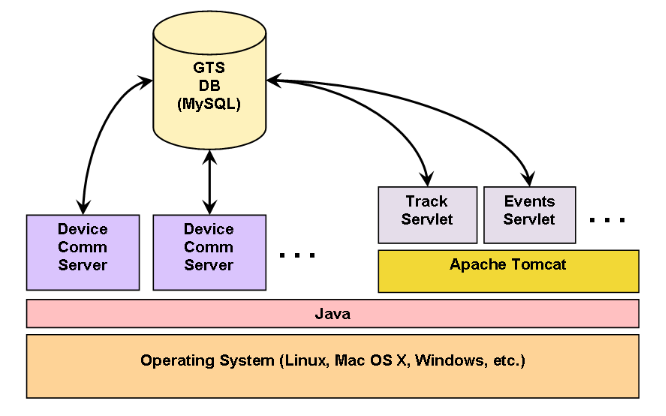
A.2) What is the basic overall architecture of OpenGTS? [_]
top A.3) How do I get started learning about the OpenGTS configuration options? [_]
The OpenGTS code base is a highly configurable enterprise grade system.
After downloading and installing the OpenGTS system, most of the
customizaton changes can be made in one of the following runtime configuration files:
top B.1) What OS platforms are supported by OpenGTS? [_]
OpenGTS has been successfully installed on the following platforms:
B.2) How do I install OpenGTS? [_]
The document "OpenGTS_Config.pdf", included in the downloaded zip file package,
contains step by step information for installing OpenGTS.
top B.3) Can I install OpenGTS on a virtual or shared server? [_]
This depends on the features and support provided by the virtual or shared hosting service provider.
You will need to be able to install the software tools required for OpenGTS (Java,
Ant, Tomcat,
MySQL, etc).
You should also have 'ssh' access to the server
to be able to remotely administer the GTS database and tables, restart Tomcat when necessary, and monitor log files.
Each virtual/shared hosting service provider is different, so you will need to check with the specific provider to see
if they support the features you require. These are some of the questions you should ask:
top B.4) What are the system hardware requirements to run OpenGTS? [_]
The following is the general recommended system configuration for running OpenGTS in a production environment:
B.5) How do I upgrade OpenGTS to the latest version? [_]
Review the "
README.txt" and "CHANGELOG.txt" files for any notes that may be
important for the new version. The general procedure for updating OpenGTS to the latest version is as follows:
top B.6) How do I enable available optional table columns? [_]
Various tables within GTS provide for additional table columns which can be used for special
application requirements. These table columns can be enabled by setting specific property values
within one of the available "
.conf" files (ie. "config.conf", etc).
Here is a summary of the common types of available additional table columns:
OpenGTS® Installation/Configuration Manual
After making any changes to the runtime configuration to define additional table columns, the
database tables themselves need to be updated to add the new columns to the existing tables.
The following Linux commands will update the tables with the newly added fields:
    cd $GTS_HOME
    bin/dbAdmin.pl -tables=ca
On Windows, the commands would be as follows:
    cd %GTS_HOME%
    bin\dbConfig.bat -tables:ca
(Note: this command make take some time to complete if there are over 1 million records in the tables,
such as the EventData table. Please plan accordingly.)
Also Rebuild/Redeploy the " track.war" file, and
restart any running DCS modules, so that these modules will also
pick up the new table column changes.
top B.7) How do I view messages sent by the CelltracGTS™/Pro application? [_]
The CelltracGTS™/Pro
Android phone tracking application supports including a message with impromptu
events sent to the server. To view messages sent by CelltracGTS™/Pro, perform the following steps:
B.8) How do I check my OpenGTS installation to see if it was installed properly? [_]
The procedure for checking the OpenGTS installation is described in Section 3.2 of the
"OpenGTS_Config.pdf" documentation.
The Linux command for checking the OpenGTS installation is as follows:
    %  cd $GTS_HOME
    %  bin/checkInstall.sh
This command will check several different aspects of the OpenGTS installation and display a summary
report of its findings. Any errors or warnings should be corrected, or at least understood, before
running the system in a production environment.
top B.9) How do I load the sample data into OpenGTS? [_]
Additional documentation for installing sample 'demo' data into the database can be
found in the "
README.txt" file in the OpenGTS "sampleData/" directory at
"sampleData/README.txt".
top B.10) How do I install multiple versions of the 'track.war' file? [_]
The typical URL for accessing the login page is as follows:
http://login.example.com:8080/track/Track
(where "
The name "track" listed above derives it's name from the name for
the war file, in this case "track.war".
This means that you can install multiple/different copies of the "track.war" file, as long as the name of
the war file is changed during the copy.
For example, if you copy the "track.war" file to Tomcat as follows:
% cp $GTS_HOME/build/track.war $CATALINA_HOME/webapps/track1.war
Then you could then access this installed version with the following URL:
http://login.example.com:8080/track1/Track
top
C.1) How do I change the displayed language translation (ie. locale)? [_]
This can be changed in the '
private.xml' file. On the "Domain" tag, change
the "locale" to the desired 2-letter country code. For example, to change
the language to German, set the Domain "locale" attribute to 'locale="de"'.
You can also add a pull-down language selection menu to the login page by setting the Property
"accountLogin.showLocaleSelection" to "true". The language selections are specified
in the "SupportedLocales" tag.
(Rebuild/redeploy the ' track.war' file after making any changes to the 'private.xml' file.)
top C.2) How do I change the look-and-feel of the web-interface? [_]
The colors and fonts can be changed by modifying the various 'CSS' files located in the directory
"
war/track/css/". The various available 'JSP' files used to display the web-interface are
located in the directory "war/track/jsp/", and and have the name format "loginSession*.jsp".
Which one of these "loginSession" files is used to display the web-interface is controlled in
"private.xml" by the "JSPEntries" tag specification, and the "WebPages"
tag attribute "jsp". The "private.xml" file itself has many configurable options
that can also be modified to change the look-and-feel. Here is a partial list of look-and-feel features
that can be configured within the "private.xml" file:
private.xml" file for more information.
(Rebuild/redeploy the 'track.war' file after making any changes to the ' private.xml'
file, or any of the CSS files.)
top C.3) How do I change the default displayed map location and zoom when no pushpins are displayed? [_]
This can be changed in the '
private.xml' file. Currently, the default latitude/longitude
and zoom centers over the US. To change this to another location, look for the "default.zoom",
"default.lat", and "default.lon" properties in the active "MapProvider",
and change them to the desired value:
    ...
    <Property key="default.zoom">4</Property>
    <Property key="default.lat">39.0000</Property>
    <Property key="default.lon">-96.5000</Property>
    ...
Change the latitude/longitude and zoom level do your desire location.(Rebuild/redeploy the ' track.war' file after making any changes to the 'private.xml' file.)
top C.4) How do I change the speed settings for the pushpin colors displayed on the Device map? [_]
The actual pushpin icon selection is determined in the JavaScript function "
evHeadingMarkerURL" found in the
JavaScript module located at "war/track/js/maps/jsmap.js". You can change the chosen pushpin, based on the
current speed, by modifying this function. To set the matching "Legend" displayed on the Device map, you
will need to modify the "Legend" tag section of the currently active MapProvider.
top C.5) How do I change the displayed data/time formats? [_]
This can be changed in the '
private.xml' file. Look for the "DateFormat" and
"TimeFormat" tag sections.
(Rebuild/redeploy the ' track.war' file after making any changes to the 'private.xml' file.)
top C.6) How do I change the map provider? [_]
This can be changed in the '
private.xml' file. Look for the "MapProvider" tag
sections and enable the desired MapProvider (ie. 'active="true"'), while
disabling the other MapProviders (ie. 'active="false"'). Make sure you comply with
the terms-of-use for the map-provider which you are using.
(Rebuild/redeploy the ' track.war' file after making any changes to the 'private.xml' file.)
top C.7) How do I change the maximum number of pushpins displayed on the map? [_]
In most cases there is no actual limit on the number of pushpins that may be displayed on a map, however
there may be a "practical" limit on the number of pushpins that a user may be able to comprehend or assimilate.
The 'default' maximum number of pushpins that can be displayed on a map is set to 1000, however this
limit can be set lower, or higher, in the '
private.xml' file within the active "MapProvider" section.
The following properties may be set to control the maximum pushins displayed on the "Device" map, "Fleet" map,
or the map available on certain reports:
     <Property key="map.maxPushpins.device">500</Property>
     <Property key="map.maxPushpins.fleet">500</Property>
     <Property key="map.maxPushpins.report">500</Property>
The above example properties will set the maximum number of displayed pushpins to 500 for
the Device, Fleet, and report maps.
(Rebuild/redeploy the ' track.war' file after making any changes to the 'private.xml' file.)
top C.8) How do I enable reverse-geocoding (ie. turning a latitude/longitude into an address)? [_]
There are a couple parts to the reverse-geocoding configuration:
The following command will test the configured active reverse-geocode provider:
    %  cd $GTS_HOME
    %  bin/rgTest.sh -pl=default -gp=39.12345/-142.12345
Where "-pl=" specifies the "default" private-label configuration, and "-gp=" specifies
the latitude/longitude (GeoPoint) that you wish to test with the active reverse-geocoding provider.(Rebuild/redeploy the ' track.war' file after making any changes to the 'private.xml' file.)
top C.9) I've enabled reverse-geocoding, but why are my address still blank? [_]
This can occur for one of several possible reasons:
rgTest.sh" command (see above) and the
log files from the running device communication server (DCS) should diagnose the reverse-geocoding issue.
top C.10) My report addresses are fine, but why are the addresses in my email notifications blank? [_]
- Reverse geocode providers that publish their service over the web are considered "slow" reverse-geocoding
operations because they are dependent on Internet network latencies and often cannot return their address
information quickly enough (Internet-based reverse-geocode providers typically take a few seconds to return
their result).
- If the reverse-geocode provider is considered a slow Internet-based service, then when an event arrives in a device communication server (DCS) it spawns a thread which is allowed to take its time to query the reverse-geocode an address, allowing the main thread to continue quickly. The main thread then continues and if any notifications need to be sent, they will not yet have an address value (" ${address}", "${fullAddress}", etc,
will be blank) because the reverse-geocoder has not yet obtained an address.
- If having an available address value is required at the time a notification is sent, there are two possible solutions:
C.11) How do I change the map and report Calandars to show Monday as the first day of the week? [_]
This can be changed in the '
private.xml' file. Look for the following Property definition:
<Property key="calendar.firstDayOfWeek">0</Property>
Then set the value to '1' (ie. 0=Sunday, 1=Monday, ...).
(Rebuild/redeploy the ' track.war' file after making any changes to the 'private.xml' file.)
top C.12) How do I configure outbound SMTP (EMail) service? [_]
Outbound SMTP (EMail) support can be configured in the '
config.conf' file. Look for the following Property definitions:
    # --- SMTP
    # - (outgoing email configuration parameters)
    smtp.host=smtp.example.com
    smtp.port=465
    smtp.user=someuser
    smtp.user.emailAddress=someuser@example.com
    smtp.password=somepass
    smtp.enableSSL=true
Set "smtp.port" to the SMTP server IP address or host name.
Set "smtp.port" to the SMTP service port number.
Set "smtp.user" and "smtp.password" to the outbound SMTP service username and password.
Set "smtp.user.emailAddress" to the "From" email address (if required).
Set "smtp.enableSSL" to "true" if the outbound SMTP service requires SSL.
(Rebuild/redeploy the 'track.war' file after making any changes to the ' custom.conf' file.)
top C.13) How do I send outbound SMS messages from OpenGTS? [_]
The easiest way to send outbound SMS message is through an email-to-SMS service available from your wireless service provider.
Most wireless service providers support assigning an email address to a phone, such as "1234567890@phone.example.com",
where they will translate emails sent to this phone email address into an SMS message which they will forward on to the phone.
Contact your wireless service provider to see if they support this email-to-SMS service.
top C.14) How do I set the first page viewed after logging in (other than the main menu)? [_]
After logging in, the default first page viewed is the main menu. To set this to a different page (such as
the vehicle or fleet maps), create a user (such as the default user "admin"), then edit the user to set
the "First Login Page" pull-down menu to the desired default page to first display after the user logs in.
top C.15) How do I download and serve my own local copy of "OpenLayers.js"? [_]
The "
OpenLayers.js" JavaScript is used to display map tiles in the client browser when using the
OpenLayers/OpenStreetMaps MapProvider.
In some cases it may be more advantageous to download your own copy of the "OpenLayers.js" JavaScript
and serve it yourself from your own server. The following steps describe how to configure the GTS to use your own
copy of the "OpenLayers.js" JavaScript, rather than use the version pulled directly from the
OpenLayers.org server:
OpenLayers.js" JavaScript, you may wish to periodically
check for updates from OpenLayers.org and download/install the latest version.
(Rebuild/Redeploy the " track.war" file, and restart any running DCS modules, after making any changes to the runtime configuration files.)
top C.16) How do I install the MapQuest AppKey to use for "Nominatim" reverse-geocoding? [_]
To use the "
nominatim" ReverseGeocodProvider, MapQuest requires that an AppKey now be included in the
reverse-geocoding request. A free app-key can be obtained from Mapquest at
"https://developer.mapquest.com/".
The "nominatim" reverse-geocoding can be configured to include your registered app-key by editing the
"private/private_common.xml" file and changing the following line ...
<Property key="reverseURL">http://open.mapquestapi.com/nominatim/v1/reverse?</Property>To this ... <Property key="reverseURL"><![CDATA[http://open.mapquestapi.com/nominatim/v1/reverse?key=YOUR_APP_KEY&]]></Property>Where " YOUR_APP_KEY" is replaced with the registered app-key obtained from MapQuest.
[don't forget to include the ampersand (&) at the end of your app-key]
After adding the above app-key to the " nominatim" configuration, stop and restart all of the running DCS files.
top C.17) How do I enable the RuleFactoryExampe feature to send event email notifications? [_]
This "RuleFactoryExmaple" is intended to be an example starting point for creating your
own customized rule 'selector' parser and notification system. To complete the installation
of the RuleFactoryExample feature, complete the following steps:
D.1) How do I change the Tomcat listen port? [_]
The default port "8080" can be changed in the Tomcat '
server.xml' configuration file
at "$CATALINA_HOME/conf/server.xml". Note that on Linux, binding to to a port less
than (or equal-to) 1024 requires that Tomcat be run as 'root',which is not recommended.
If you wish to access the web-interface on port 80, an alternative method would be to use
'iptables' to forward requrest on port 80 to port 8080. This can be accomplished with
the following example 'iptables' entries:
    /sbin/iptables -t nat -I PREROUTING -p tcp --dport 443 -j REDIRECT --to-ports 8443
    /sbin/iptables -t nat -I PREROUTING -p tcp --dport  80 -j REDIRECT --to-ports 8080
top
D.2) How do I remove the ":8080" port and "/track/Track" requirements from the Login URL? [_]
The typical login URL is "
http://track.example.com:8080/track/Track" (where
"track.example.com" is the domain name of your server). This URL is usually placed in a link
from another company webpage so the user never needs to specifically enter this URL. However, in some
cases it may be necessary, or desireable, to instead only require that a user go directory to a url such
as "http://login.example.com" to login, instead of requiring that the ":8080" and
"/track/Track" also be included. The easiest way to accomplish this is to create an
"index.html" file which loads the login url into a single frame. This way the user can enter
a url such as "http://login.example.com", and have the "index.html" file load
the actual login url into a frame. The latest version of OpenGTS provides a feature will create this 'frame' html for you. Assuming that " http://track.example.com:8080/track/Track"
is the URL used to view the login page, the following URL will automatically produce the html 'frame'
page required that can be used on another static web server to eliminate the need to enter the
":8080" or
the "/track/Track" specification (change the domain name and port to fit your specific requirement):
http://track.example.com:8080/track/loginFrame.html
Right-click and save this HTML page (ie. "Save Page As") and copy the resulting file to a directory on your
static web-server. For instance, if you have a static web-server at the location "http://login.example.com",
and you copy the above html to a file called "index.html" in the root directory of your web-server
(typically "htdocs"), then you should be able to see the login page at "http://login.example.com".
top D.3) How do I change the default session timeout value for Tomcat? [_]
This can be changed in the Tomcat default "
web.xml" file found in the Tomcat
directory "$CATALINA_HOME/conf/web.xml". Here is the section of the "web.xml"
file that sets the timeout to 30 minutes:
     <session-config>
         <session-timeout>30</session-timeout>
     </session-config>
You can change this value to any desired length of time. Tomcat should be restarted after this value
has been changed. (Note: setting this value too large may cause excessive resources to be consumes
by users which have logged in, but are not actually using the system).
top D.4) How do I configure SSL (ie. "https") in Tomcat? [_]
Configuring SSL (Secure Socket Layer) within Tomcat allows secure access to the GTS login, ensuring
that all data sent between the server and client web-browser is encrypted. The followig Apache Tomcat
SSL configuration URL will describe how to configure SSL withint Tomcat:
http://tomcat.apache.org/tomcat-6.0-doc/ssl-howto.html
top
D.5) I've copied my changed "track.war" file to Tomcat, but I don't see my changes? [_]
Servlet
.war files, such as "track.war" are typically deployed to the Tomcat
webapps/ directory.
If Tomcat is configured with autoDeploy="true" (the default configuration in
"conf/server.xml"), then any .war file copied to the Tomcat webapps/
directory should be automatically deployed.
However, if for some reason your installation of Tomcat is not automatically deploying the new
track.war file, you can usually force a deployment using the following steps:
E.1) How do I increase the number of allowed MySQL connections? [_]
Currently, each thread process is allocated a MySQL connection (for simultaneous device communication
server connections, etc).
The MySQL command "
SHOW PROCESSLIST" will display all current connections,
and the command "SHOW VARIABLES LIKE 'max_%connections'" will show the current value of the MySQL
connection variables.
To increase the number of allowed MySQL connections, add the following to the
MySQL config file "/etc/my.cnf", in the "[mysqld]" section (or increase their current
value if these properties are already defined):
     max_connections=300
     max_user_connections=300
Then restart MySQL after changing this configuration.The following MySQL website will provide more information on this issue:
http://dev.mysql.com/doc/refman/5.5/en/too-many-connections.html
top
E.2) How do I reset the MySQL 'root' password? [_]
If you have forgotten the MySQL 'root' password, it can be reset using this procedure recommended by 'dev.mysql.com':
http://dev.mysql.com/doc/refman/5.0/en/resetting-permissions.html
top
E.3) How do I repair a MySQL reported error indicating an "Incorrect key file"? [_]
During a normal system shurdown or reboot, the MySQL service is stopped gracefully, however
if the MySQL database was not shutdown normally (as can occur during a power-fail, etc)
a MySQL table key index can be come corrupted, resulting in an error similar to the following:
java.sql.SQLException: Incorrect key file for table './gts/EventData.MYI'; try to repair it
Or, possibly an error similar to the following:
java.sql.SQLException: Table './gts/EventData' is marked as crashed and should be repaired
The following MySQL website describes how to repair key file issues:
http://dev.mysql.com/doc/refman/5.0/en/myisam-repair.html
top
E.4) How do I copy the MySQL "gts" database to another computer? [_]
The default name of the MySQL GTS database is "
gts" (overridable in the "common.conf" file with the
property "db.sql.dbname").
This database can be copied from one computer to another using the procedures outlined by MySQL at the following link:
http://dev.mysql.com/doc/refman/5.0/en/copying-databases.html
top
F.1) How do I use a Boost Mobile Motorola GPS phone with OpenGTS? [_]
For information regarding support for various Boost Mobile Motorola phones, please see the document
at "
MotoDMTP/MotoDMTP.txt" in the OpenGTS installation directory.
top F.2) How do I use a Sanav GC-101/GX-101 with OpenGTS? [_]
Additional documentation for installing and configuring the GC-101 server within OpenGTS can be
found in the "
README.txt" file in the "gc101" source directory at
"src/org/opengts/war/gc101/README.txt".
top F.3) How do I use the "Aspicore GSM Tracker" Nokia phone tracking software with OpenGTS? [_]
The document "OpenGTS_Config.pdf", included in the downloaded zip file package,
contains information for installing/configuring the device communication server for Aspicore supported phones.
top F.4) Why am I getting a "Read timeout" when using the "sipgear" DCS with a TK102 device. [_]
Some TK102 devices do not provide a proper packet terminating character which would indicate to the server that
the packet is complete and can be processed. If this is the case, you can try adding the following property
to the "
dcservers.xml" file, in the "sipgear" DCServer section:
<Property key="packetLenEndOfStream">true</Property>
This configuration will cause the data end-of-stream to be considered the packet termination so that the
packet can then be parsed and processed.
top F.5) What is the best GPS tracking/telematic hardware? [_]
The best hardware greatly depends on the specific requirements for the GPS tracking/telematic application.
Here are some of the questions that need to be answered to best fit the GPS tracking/telematic hardware to the applicaton:
top F.6) How many devices can OpenGTS track? [_]
OpenGTS has been successfully used to track thousands of devices on a single server. Here are some
of the factors that can effect the number of devices that a single server can track:
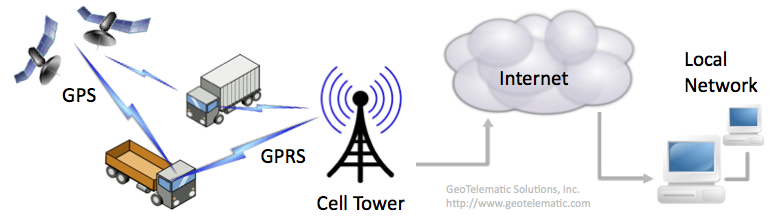
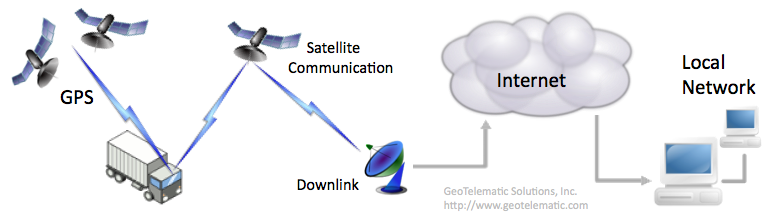
top F.7) How is GPS tracking/telematic data sent from the device to the server? [_]
Depending on the capabilities of the device, data can be transmitted to the server in one of several ways.
The following describes some of the methods used by devices to transmit data to the server:
top F.8) How do I create my own device communication server (DCS)? [_]
In order for OpenGTS to receive data from a device, a customized "Device Communication Server" (DCS) will need to be implemented that
understands the protocol used to communicate with the remote device, and insert received events into the SQL database.
A chapter in the "OpenGTS_Config.pdf" installation/configuration document
("Creating Your Own Device Communication Server") describes the starting point for implementing your own
device communication server.
top F.9) Why do the TCP sessions in my DCS module always time-out? [_]
The default behavior of most of the supported DCS modules is to force a TCP session closed after a certain
timeout to release/reuse system resources used by the TCP session. This allows greater scalability
for supporting a larger number of devices.
However, some devices which use TCP mode to send data to the server may require that they always maintain
a constant connection with the server (sometimes even if they have no data to transmit). In this case it
may be necessary to configure the DCS module to increase the timeout to a larger value.
This can be configured in the "
dcservers.xml" file (or
"dcservers/dcserver_XXXXX.xml" file, where XXXXX is
the DCS id) by increasing the TCP session timeout value (for example, '7200' seconds - 2 hours)
as follows:
    <Property key="tcpIdleTimeoutMS">1800000</Property>
    <Property key="tcpPacketTimeoutMS">1800000</Property>
    <Property key="tcpSessionTimeoutMS">7200000</Property>
(Note that the timeout values are specified in milliseconds)This will cause the DCS, for which the above properties were set, to leave the TCP session open for at least 2 hours, before forcing the session to close. (Note: each connected TCP connesion consumes system resources - memory, threads, filehandles, etc. Having many such connected TCP sessions may significantly limit the number of devices which can connect with your server). top F.10) Why does my event table contain events dated in the future, and how do I delete them? [_]
Occasionally some GPS tracking devices will send an event to the server with a date/time which is in the future, sometimes
a long time into the future. This can be caused by marginal GPS converage. This condition can be prevented by setting
the following properties in the "
common.conf" file:
     Device.futureDate.action=ignore
     Device.futureDate.maximumSec=86400
The above specification will cause all events to be ignored which are more than 1 day (86400 seconds) into the future.The following command can be used to obtain a count of all future events for a specific account and device:
     cd $GTS_HOME
     bin/admin.sh Device -account=myaccount -device=mydevice -countFutureEvents=3600
The above command will display a count of events which are more than 1 hour (3600 seconds) into the future. [replace
"myaccount" and "mydevice" with the desired account/device id.]The following command can be used to delete these future events for a specific account and device:
     cd $GTS_HOME
     bin/admin.sh Device -account=myaccount -device=mydevice -deleteFutureEvents=3600
The above command will delete events which are more than 1 hour (3600 seconds) into the future. [replace
"myaccount" and "mydevice" with the desired account/device id.](make sure you back-up the EventData table before deleting any records) top F.11) How do I trim/delete old events from the EventData table? [_]
The following command example can be used to obtain a count of all old events for a specific device within an account.
This example will display a count of events which are more than 120 days old.
[replace "
myaccount" and "mydevice" with the desired
account/device id.]
(v2.3.9-B30+)
     cd $GTS_HOME
     bin/admin.sh Device -account=myaccount -device=mydevice \
            -countOldEvents=-120d
The following command can be used to delete old events for a specific device within an account.
This example will delete events which are more than 120 days old. [replace
"myaccount" and "mydevice" with the desired
account/device id.]
(v2.3.9-B30+)
     cd $GTS_HOME
     bin/admin.sh Device -account=myaccount -device=mydevice \
            -deleteOldEvents=-120d -confirmDelete
Since this delete cannot be undone, the option "-confirmDelete" is required to ensure
that you intend to delete the events.
(make sure you back-up the EventData table before deleting any records)
top F.12) Why does my GPS-based odometer calculation not match my vehicles actual odometer? [_]
Using a GPS-based odometer calculation, which accumulates the distances between successive GPS events, tends to
underestimate the actual odometer while the vehicle is moving, because it tends to "straighten out" the roads,
since GPS event is typically only sent to the server every few minutes. In some cases it can also overestimate
the vehicle odometer while the vehicle is stopped because stray GPS events can cause the accumulated distance
to increase even while the vehicle is stopped. If the device itself is capable of obtaining the actual vehicle
odometer, this would be the most accurate as it would exactly reflect the actual odometer of the vehicle.
top G.1) When attempting to build the project, why do I get a "Permission Denied" error? [_]
This error can occur on Linux when building the OpenGTS project as one user (such as "
opengts"),
when another user (such as "root") happens to own some, or all, of the files in the installation directory.
All of the files within the GTS installation directory should be owned by the same user which is building the project.
To make sure that all of the files are owned by the proper user, the following command may be executed as "root":
chown -R opengts:opengts /usr/local/OpenGTS_1.2.3
The "-R" indicates that a recursive ownership change should be performed. The "opengts:opengts"
indicates the user and group to which the directory ownership should be changed (change this to your preferred user:group).
And "/usr/local/OpenGTS_1.2.3" should be the absolute path of where GTS was installed (change this to the
actual directory path where GTS was installed).(see the Linux " man" page for "chown" for more information on this command - ie. command "man chown")
top G.2) How do I fix the compile error "... package javax.mail does not exist"? [_]
This compile error occurs when the JavaMail library has not yet been installed. Please refer to the
"OpenGTS_Config.pdf" document (section 2.2) for additional
information.
top G.3) How do I fix the login error "Error reading Account"? [_]
When attempting to log-in, if you see an error panel which displays "Error reading Account", this is
usually due to the OpenGTS database not having been properly initialized for MySQL (or if MySQL is not
currently running). Refer to the "OpenGTS_Config.pdf"
document for how to initialize the OpenGTS database for MySQL, then run the "
bin/checkInstall.sh"
command to check the installation (see "How do I check my OpenGTS installation
to see if it was installed properly?" above). If the error persists, then also check the Tomcat log
files (ie. "$CATALINA_HOME/logs/catalina.out") to see if it presents any clues regarding why
the database error is occurring.
top G.4) How do I fix the web-page Status 404 error "'private.xml' contains syntax/parsing errors"? [_]
This occurs when the file '
private.xml' has been modified, and XML syntax errors have been introduced
into the file. Running the command "bin/checkInstall.sh" should help pinpoint where in the file the
XML syntax errors exist. Fix the XML syntax errors, then re-run the "bin/checkInstall.sh"
command to see if the XML syntax errors were corrected. Then rebuild/redploy the 'track.war' file.
top G.5) How do I fix the web-page Status 404 error "The requested resource (/track/Track) is not available"? [_]
This occurs when Tomcat is running, but the '
track.war' file has not been properly deployed to
Tomcat's "webapps" directory (ie. "$CATALINA_HOME/webapps/."). Make sure that the
OpenGTS "build/track.war" file has been copied to the Tomcat "webapps" directory.
Tomcat should then automatically deploy the "track.war" file by unzipping the file and making it
available through the web-interface (if Tomcat does not automatically deploy the track.war file, make sure
that Tomcat's "autoDeploy" property is set to "true", in the Tomcat "conf/server.xml" file).
Also make sure that you are using the proper
URL when attempting to access the login page. Assuming that you have installed Tomcat on the server "localhost",
using port "8080", the correct URL should be "http://localhost:8080/track/Track".
top G.6) How do I fix the web-page error "The requested resource (/track/track) is not available"? [_]
URLs are case-sensitive. The correct URL should be specified as "
http://localhost:8080/track/Track",
with the first letter of the second "Track" capitalized.
("localhost" should be replaced with your appropriate domain name).
top G.7) After logging-in, selecting any menu option logs me out again. [_]
If everytime you log-in and select a menu option, it always logs you out and displays the login page again, then the
most likely reason is that your client browser is not accepting cookies from the server. The GTS server uses
client-side cookies to maintain session state. If cookies are disabled, the server is not able to determine that
the user has logged-in. To correct this, configure your client browser to accept cookies from the server providing
the GTS service.
top G.8) How do I fix the command-line error "Can't locate .../common.pl in @INC ..."? [_]
This command-line error can occur when executing a Perl command script, and the "
GTS_HOME" environment
variable is not set, or is set to an invalid location. Set the "GTS_HOME" environment variable to
the proper location, and try the command again.
top G.9) How do I enter command-line options on Windows? [_]
When running a command from the command-prompt on Windows, command options/value pairs must be separated
by a colon ":" character as in the following example:
> bin\dbConfig.bat -tables:cakNote that if the " =" character is used to separate the option key from the value
(as in "-tables=ca'), Windows may not parse the option/value properly to send to the executing
program. (On Linux, using either the "=" or ":" separator character is acceptable).
top H.1) How do I find out more about other commercially available tracking/telematic features? [_]
You can find additional information regarding the features available in the commercial GTS Enterprise
at the following link:
http://www.geotelematic.com/gts.html
top
Glossary: (terms/abbreviations, and their brief descriptions follow)
top | ||||||
|